

Single Sign-On (SSO)
Overview
Koddi leverages Auth0 to manage authentication and federation, providing seamless integration with your existing corporate identity infrastructure. This approach delivers:
- Unified authentication using existing corporate credentials
- Centralized security controls and compliance with organizational access policies
- Flexible integration supporting industry-standard protocols
Your Koddi team will guide you through the configuration process during implementation.
Supported Identity Providers
Koddi supports SSO integrations with most enterprise and cloud identity systems. Common providers among Koddi customers include:
| Identity Provider | Supported Protocols | Notes |
|---|---|---|
| Okta (Workforce / Classic) | SAML 2.0, OIDC | Common across enterprise clients |
| Microsoft Azure AD | OIDC, SAML 2.0 | Recommended for Microsoft 365 environments |
| Google Workspace | SAML 2.0 | Supports domain-based access |
| PingFederate / PingOne | SAML 2.0 | Suitable for hybrid and on-premise setups |
| OneLogin | SAML 2.0, OIDC | Configurable via standard SAML/OIDC endpoints |
| Salesforce | SAML 2.0 | Enterprise CRM integration |
| Microsoft ADFS | SAML 2.0 | On-premise federation services |
| Auth0 | SAML 2.0, OIDC | Direct Auth0-to-Auth0 federation |
If your organization uses a different identity provider, Koddi can typically support it through standard SAML or OIDC configuration.
Supported Authentication Protocols
Auth0 supports widely used enterprise authentication standards, enabling compatibility with nearly all major identity systems:
| Protocol | Description | Typical Use Case |
|---|---|---|
| SAML 2.0 | XML-based standard for exchanging authentication and authorization data | Enterprise SSO systems (Okta, ADFS, PingFederate) |
| OpenID Connect (OIDC) | Modern identity layer built on OAuth 2.0 using JSON Web Tokens (JWTs) | Cloud-native IdPs (Azure AD, Okta Workforce) |
| OAuth 2.0 | Authorization framework for secure delegated access | Backend and service-to-service integrations |
Additional connection types such as Active Directory/LDAP, Enterprise Federation, and Social Identity Providers (Google, Microsoft, LinkedIn) are also available based on your requirements.
Configuration Requirements
To configure Koddi as the service provider (SP) in a SAML federation, you'll need to create a connection and update your SAML identity provider (IdP) with the connection's metadata.
Required Information from Your IdP
For SAML 2.0:
- Sign In URL - The SAML Single Sign-On endpoint (also called SSO endpoint)
- X.509 Certificate - PEM or CER-encoded certificate used to sign assertions
- Sign Out URL (optional) - Single Logout (SLO) endpoint, if supported
- User ID Attribute - Attribute in the SAML token mapped to email (commonly
email) - Sign Request Algorithm / Digest Algorithm - Found in metadata
- Protocol Binding - Supported binding type (POST or Redirect)
For OpenID Connect (OIDC):
- Connection Name - Unique identifier for your connection
- Issuer / Domain - Base domain of your IdP (e.g.,
example.okta.com) - Client ID - Identifier for your OIDC app
- Client Secret - Secret key for token exchange
For OAuth 2.0:
- Authorization Endpoint - URL where authorization requests are sent
- Token Endpoint - URL for exchanging authorization codes for access tokens
- Scopes - Access level or permissions (e.g.,
openid,email,profile) - Redirect URI - Provided by Koddi
What Koddi Will Provide
- Service Provider (SP) metadata
- Assertion Consumer Service (ACS) URL
- Entity ID and Audience URI
- Redirect URI (for OAuth/OIDC flows)
Security Note: Your Koddi team will share a secure method to exchange sensitive configuration information.
Security and Compliance
Koddi's SSO implementation adheres to industry best practices:
- All SSO connections are secured via TLS 1.2+
- SAML assertions are signed and validated using the IdP's X.509 certificate
- No passwords or credentials are stored or managed by Koddi
- Auth0 environment configured for least-privilege access
- Complies with industry security frameworks
Integration Process
| Step | Description | Responsible Party |
|---|---|---|
| 1. Configuration Exchange | Partner provides metadata, certificates, and IdP configuration | Partner |
| 2. Koddi Setup | Koddi configures Auth0 and validates metadata | Koddi |
| 3. Testing | Verify authentication and attribute mapping | Koddi + Partner |
| 4. Production Enablement | Enable SSO for all users | Joint effort |
Testing Validation
During integration testing, the following are verified:
- Successful SSO login and logout flow
- Accurate mapping of SAML attributes
- Domain-based access verification (if applicable)
- Session handling and redirect behavior
- New user provisioning on first login
Your Koddi team will share a secure way to send us this information.
Using SSO with Embeddables
If you are using a Koddi embeddable, you can use the token endpoints to authenticate for the embeddable.
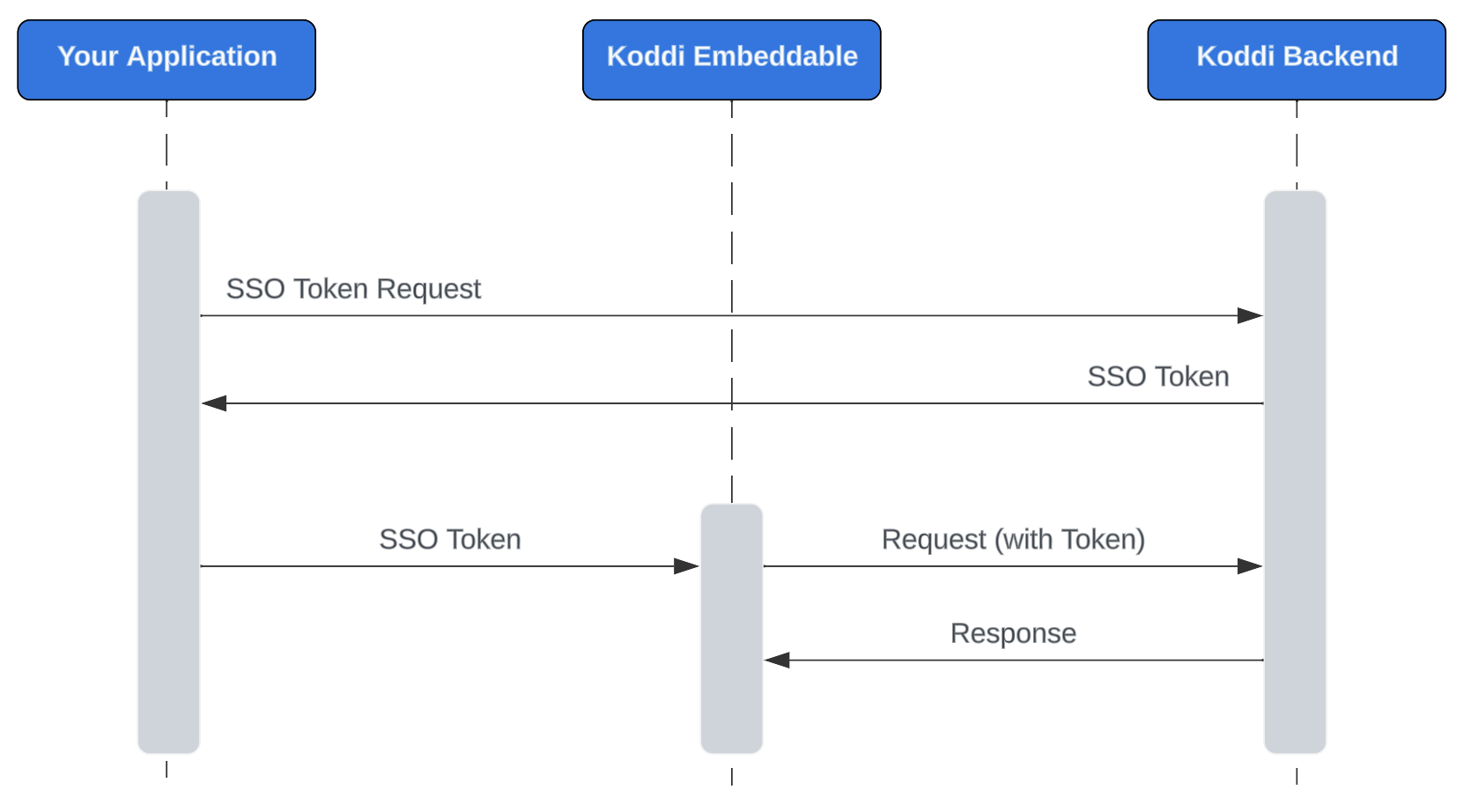
Koddi embeddables utilize window.postMessage for receiving messages with an auth token. This method provides a way to safely send cross-origin messages between window objects. It allows a parent page to send messages to a page contained within an embedded element. The method also provides a way to specify the origin of the request. The application using the embedded element specifies where the token should be sent and the Koddi embeddable can check where the message was sent from to ensure we’re only responding to messages from valid origins.
Once received, Koddi will:
- Configure your connection in Auth0
- Validate your SAML or OIDC configuration
- Coordinate a testing session to verify successful authentication
- Activate SSO in your production environment upon successful testing
Updated 9 months ago